Liene PixCut S1 vs Canon SELPHY CP1500: sticker printing compared
Both are 300 DPI dye-sublimation printers (Liene tech specs; Canon spec sheet). The PixCut S1 prints 4×7 in sticker sheets and cuts around designs, while Canon’s specifications for the SELPHY CP1500 list no cutter and its sticker media are card-size label sheets (full-page, 8-label, square) (Canon manual).
By the editorial team · Last updated
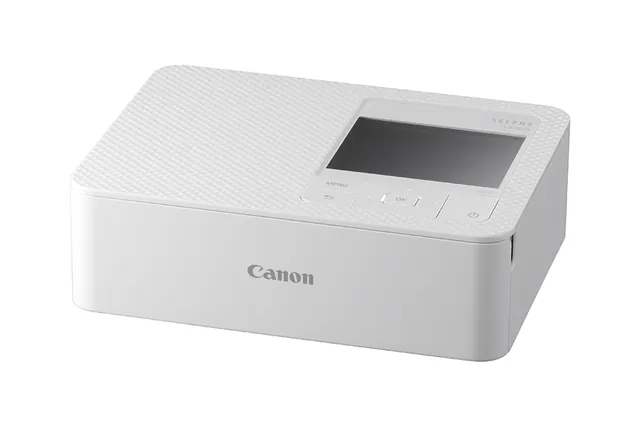
The SELPHY CP1500 is Canon’s representative compact photo printer in this comparison. Every cell below comes from Liene or Canon; our own arithmetic is labelled. We have not used either printer.
Key differences
| Spec | Liene PixCut S1 | Canon SELPHY CP1500 |
|---|---|---|
| Cutter | Yes — kiss-cuts around the design after laminating1 | No cutter listed in Canon’s specifications2 |
| Sticker media and sizes | 4 × 7 in sticker paper; sticker printing size 3.9 × 6.7 in3 | Card-size label sheets: full-size label 54 × 86 mm (2.13 × 3.39 in); 8 labels of 22 × 17.3 mm per sheet; square label 54 × 54 mm (2.13 × 2.13 in)4 |
| Supplies price and per sheet | 4×7 sticker pack $42.99 → ≈ $0.60 per sheet (our calculation: $42.99 ÷ 72)5; 4×6 photo pack $33.99 → ≈ $0.47 per photo (our calculation: $33.99 ÷ 72)6; 72 sheets + two 36-print ribbons per pack | KP-108IN: “as low as $41.99” for 108 4×6 prints7: ≈ $0.39 per print (our calculation: $41.99 ÷ 108). KC-18IF: “as low as $14.99” for 18 full-page label sheets8: ≈ $0.83 per sheet (our calculation: $14.99 ÷ 18) |
| Connectivity | Bluetooth 5.03 | Wi-Fi (802.11 b/g, 2.4 GHz), AirPrint, USB-C, SD card slot2 |
| Apps | Liene lists Windows 10+ and macOS 12+ desktop support on its product and app download pages910; iOS and Android3 | Canon PRINT Inkjet/SELPHY and SELPHY Photo Layout2 |
| Photo paper | 4 × 6 in, printing size 3.94 × 5.83 in3 | Postcard 4.0 × 6.0 in, L 3.5 × 4.7 in, Card 2.1 × 3.4 in2 |
| Printer price (US) | From $279.999 | $179.00 at Best Buy (Canon’s own list price not in our sources)11 |
| Paper cassette / tray | Paper cassette holds 36 sheets3 | Output tray up to 18 sheets2; card-size label sets need the PCC-CP400 card-size cassette, sold separately12 |
| Screen / weight | Not published | 3.5 in LCD; approx. 1.9 lb2 |
| Same or similar on both | ||
| Print technology | Dye-sublimation thermal transfer (D2T2)3 | Dye-sublimation thermal transfer2 |
| Resolution | 300 × 300 DPI3 | 300 × 300 dpi2 |
| Third-party media | Not supported: third-party vinyl or generic sticker sheets “are not supported and may damage the machine”13 | Canon says “use genuine Canon Color Ink / Paper Sets”12 |
Sources (13)
- Liene blog, “The practical guide to custom label design with Liene PixCut S1”, accessed 5 Oct 2026 ↩
- Canon spec sheet, “SELPHY CP1500 Spec Sheet (PDF)”, accessed 26 Sep 2026 ↩
- Liene tech specs, “Technical Specifications for PixCut S1”, accessed 3 Oct 2026 ↩
- Canon manual, “SELPHY CP1500 product manual: Specifications”, accessed 3 Oct 2026 ↩
- Liene shop, “PixCut S1 4x7" Sticker Paper 72 Sheets & 2 Ink Cartridges Refill”, accessed 22 Oct 2026 ↩
- Liene shop, “PixCut S1 4x6" Photo Paper 72 Sheets & 2 Ink Cartridges Refill”, accessed 22 Oct 2026 ↩
- Canon U.S.A. shop (KP-108IN), “KP-108IN Color Ink/Paper Set”, accessed 26 Sep 2026 ↩
- Canon U.S.A. shop (KC-18IF), “Ink/Label KC-18IF”, accessed 26 Sep 2026 ↩
- Liene product page, “PixCut S1 Photo Sticker Printer and Cutter (product page)”, accessed 22 Oct 2026 ↩
- Liene app download, “PixCut S1 App Download”, accessed 19 Oct 2026 ↩
- Best Buy, “Canon SELPHY CP1500 Wireless Compact Photo Printer, White”, accessed 5 Oct 2026 ↩
- Canon U.S.A. support, “Compatible Ink and Paper – CP1500”, accessed 26 Sep 2026 ↩
- Liene materials guide, “How to Pick the Right PixCut S1 Material for Your Project”, accessed 5 Oct 2026 ↩
Which fits what you make
- If you need shaped, kiss-cut stickers, the PixCut S1 is the one of the two with a cutter: it kiss-cuts around the design after laminating (Liene blog). Canon’s specifications for the SELPHY CP1500 list no cutter (Canon spec sheet).
- If you mainly print 4 × 6 photos and small rectangular labels, the SELPHY CP1500 prints 4.0 × 6.0 in postcards and card-size label sheets (Canon spec sheet; Canon manual). KP-108IN photo supplies work out to about $0.39 per print (our calculation: $41.99 ÷ 108) (Canon U.S.A. shop (KP-108IN)), against about $0.47 per 4×6 photo for the PixCut S1 (our calculation: $33.99 ÷ 72) (Liene shop).
- If you want full 4 × 7 in sticker sheets, only the PixCut S1 lists that paper size (Liene tech specs). SELPHY label sheets are card-size (Canon manual).
- If you print from a computer, Liene lists Windows 10+ and macOS 12+ desktop support on its product and app download pages (Liene product page; Liene app download). Canon lists Wi-Fi, AirPrint and USB-C (Canon spec sheet).
- If you plan to use label sheets on a SELPHY, card-size sets need the PCC-CP400 card-size cassette, sold separately (Canon U.S.A. support).
Neither printer takes the other’s supplies: Liene supports only official Liene paper (Liene materials guide), and Canon says to use genuine Canon ink/paper sets, adding that sets for SELPHY ES series, SELPHY SQUARE QX10 or IVY are not compatible with the CP1500 (Canon U.S.A. support).
Liene PixCut S1 vs Cricut StickerPix
- Both print 4 × 7 in sticker sheets and kiss-cut around designs (Liene blog; Kerri Crafts It), at 300 DPI (Liene; Cricut).
- Liene publishes a 3.9 × 6.7 in printable area (Liene tech specs); Cricut hasn’t published one for StickerPix.
- StickerPix uses Cricut Design Space, which needs an internet connection and runs on Windows, macOS, iOS and Android (Cricut shop (US)) (Cricut doesn’t publish an account requirement on its StickerPix pages). Liene lists Windows 10+ and macOS 12+ desktop support on its product and app download pages (Liene product page; Liene app download).
- Supplies: roughly 50–70¢ per StickerPix sheet (Kerri Crafts It’s figure) (Kerri Crafts It) vs about $0.60 per PixCut S1 sheet (our calculation: $42.99 ÷ 72) (Liene shop).
Full table: Cricut StickerPix vs Liene PixCut S1. Buying criteria for all four printers: best sticker printer and cutter. Costs side by side: cost per sheet. Fix errors and jams: sticker printer troubleshooting. The SELPHY against Cricut’s cheaper model: StickerPix Print vs SELPHY CP1500. Every other option in one table: Liene PixCut S1 alternatives. Tracking holiday discounts? See our list of sticker printer Black Friday deals.
Related articles
Sources
All 15 sources, each with its access date
- Liene blog, “The practical guide to custom label design with Liene PixCut S1”
- Canon spec sheet, “SELPHY CP1500 Spec Sheet (PDF)”
- Liene tech specs, “Technical Specifications for PixCut S1”
- Canon manual, “SELPHY CP1500 product manual: Specifications”
- Liene shop, “PixCut S1 4x7" Sticker Paper 72 Sheets & 2 Ink Cartridges Refill”
- Liene shop, “PixCut S1 4x6" Photo Paper 72 Sheets & 2 Ink Cartridges Refill”
- Canon U.S.A. shop (KP-108IN), “KP-108IN Color Ink/Paper Set”
- Canon U.S.A. shop (KC-18IF), “Ink/Label KC-18IF”
- Liene product page, “PixCut S1 Photo Sticker Printer and Cutter (product page)”
- Liene app download, “PixCut S1 App Download”
- Best Buy, “Canon SELPHY CP1500 Wireless Compact Photo Printer, White”
- Canon U.S.A. support, “Compatible Ink and Paper – CP1500”
- Liene materials guide, “How to Pick the Right PixCut S1 Material for Your Project”
- Kerri Crafts It, “Cricut StickerPix Review: Print + Cut vs Print”
- Cricut shop (US), “Cricut StickerPix Print + Cut Essential Bundle”